
Using CAD on a Tablet: Faster and More Efficient Technical Drawing with a Keyboard
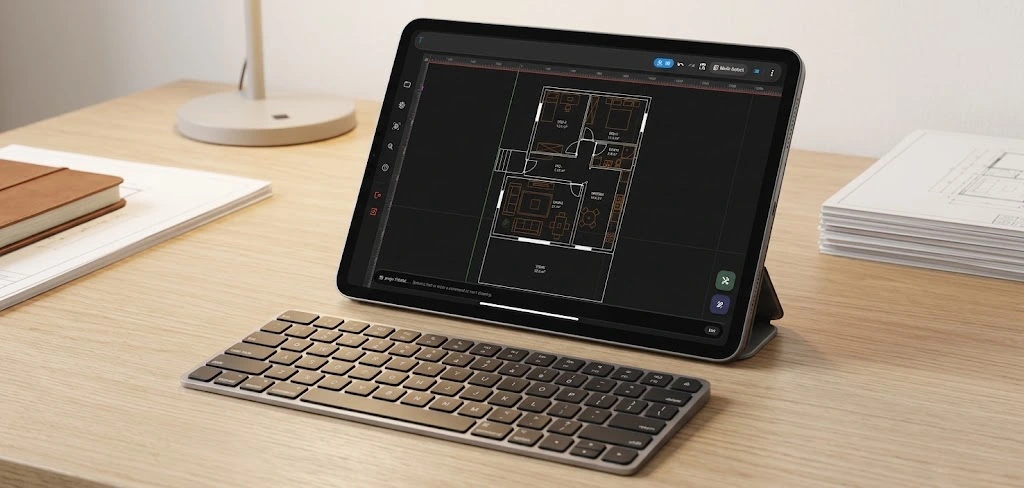
When CAD is mentioned, most people think of a classic desktop environment working with a large screen computer, mouse, and keyboard. However, the need for technical drawing no longer arises only in the office or at a fixed desk. Opening, reviewing, or editing a 2D technical drawing might be necessary at the construction site, production area, project meeting, during training, or while traveling.
At this point, mobile CAD and especially tablet CAD usage become an important alternative. When the portability of the tablet is combined with the flexibility of touch usage, it is possible to carry the working environment wherever a technical drawing is needed. However, a touch screen alone may not be enough for professional CAD users. When precise drawing, quick command usage, and familiar working habits come into play, a physical keyboard can provide a significant advantage.
For this reason, TamgamCAD offers a working experience that supports keyboard use on tablet and mobile devices. The goal is to ensure CAD users can benefit as much as possible from the fast and controlled working methods they are accustomed to, while maintaining the portability of the mobile device.
Why is it Advantageous to Use CAD on a Tablet?
Tablets can provide a lighter and more portable working environment compared to laptops, while offering a wider screen area than phones. This feature is important for examining technical drawings in the field or in meetings.
It may not always be possible to have a computer nearby when an architect needs to check the project plan in the field, a technical staff member needs to review a production drawing, a student needs to work on a technical drawing, or an engineer needs to access a DXF file during a meeting. The tablet CAD approach can make technical drawing more accessible in such scenarios.
The goal here is not to completely change the desktop CAD experience, but to make the CAD workspace mobile when necessary. When users can access their projects wherever they need them, technical drawing ceases to be a job done only in the office and becomes part of a more flexible workflow.
Why Might a Touch Screen Not Always Be Enough?
The touch screen offers a great advantage in terms of directly controlling the drawing and navigating the interface. However, in long-term technical drawing sessions, constantly touching the screen can affect working speed when it is necessary to use a large number of commands quickly.
Especially for a CAD user who frequently uses tools like Trim, Offset, and Hatch, having faster access to commands can be crucial. The physical keyboard here should be considered a complementary tool rather than an alternative to the touch screen.
Thus, while the user controls the drawing area by touch, they can execute frequently used commands faster via the keyboard. Ultimately, the tablet can turn into a more flexible CAD environment where technical drawings can be actively worked on, rather than just a file viewing device.
Advantages of Mobile CAD Usage with a Keyboard
The use of a physical keyboard can facilitate the transition to a mobile device, especially for users accustomed to the desktop CAD environment. The user can create a tailored working method for themselves by using the touch interface and the keyboard together.
- Faster command access: Frequently used CAD tools can be accessed much quicker via the keyboard.
- More controlled working: It is possible to separate command execution with the keyboard while managing the drawing area with the touch screen.
- Continuation of desktop habits: CAD users who rely on keyboards can adapt to the mobile environment more easily.
- Portable working: Technical drawing work can be taken out of the office.
- Meeting and field usage: Projects can be opened and reviewed exactly where they are needed.
Working with DXF Files in Mobile and Tablet Environments
DXF files hold an important place in technical drawing processes. This format, used for sharing drawing data between different CAD environments, is especially useful when existing projects need to be viewed and edited on other devices.
However, simply having a DXF file is not enough. It is also important to be able to open the file when needed, examine the drawing, and continue the workflow. This is where the mobile CAD approach comes into play.
The ability to view and edit DXF files in a mobile environment with TamgamCAD can take technical drawing work beyond the desktop computer. When a tablet and physical keyboard are used together, the user benefits from both a larger screen area and a keyboard-controlled working method.
CAD Usage in the Field: Technical Drawing Expanding Beyond the Office
The ability to utilize technical drawings in the field is one of the most important use cases of mobile CAD. Instead of preparing a drawing solely in the office and printing it out later, examining the digital file directly on-site can create entirely different working scenarios.
For example, a team working on a project can open the relevant drawing on a tablet during a meeting. A user in the production area can examine the technical geometry. A student or instructor can evaluate the technical drawing in a classroom setting. The portability of the tablet provides a significant advantage across all these scenarios.
Keyboard support, on the other hand, can expand the capabilities of the mobile device, especially in cases where active editing needs to be done on the drawing. Thus, the tablet ceases to be just a screen used for DXF viewing; it becomes an active component of the drawing process.
Mobile CAD is Not Just Using CAD on a Small Screen
Thinking of mobile CAD merely as a miniature version of a desktop CAD program can cause you to miss out on the opportunities offered by the mobile working experience. The main advantage of mobile devices is that they bring the technical drawing directly to the user's workspace.
Therefore, a good mobile CAD experience is not only about having the right drawing tools; elements such as touch usage, efficient utilization of screen space, file access, fast command execution, and adaptation to different working conditions are equally important.
TamgamCAD's mobile approach is shaped by this exact philosophy. The user can rely purely on the touch screen or shift their working method by connecting a physical keyboard. As a result, the same technical drawing can be handled according to different usage habits.
Who Can Benefit from Tablet CAD?
Using CAD on a tablet can be useful not only for professional CAD operators but also for many users interacting with technical drawings at various levels.
- Architects: To review plans, details, and technical drawings outside the office.
- Engineers: To access projects and technical drawings during meetings or out in the field.
- Technicians: To view and, when necessary, edit drawings directly in the production or field environment.
- CNC Users: To examine DXF-based geometries on a mobile device.
- Students: To transition technical drawing practice to a more portable working environment.
- Interior Design and Furniture Professionals: To keep project drawings with them during client meetings and field visits.
What Approach Can Be Taken for Efficient Work in Mobile CAD?
Instead of trying to exactly copy desktop habits, a user transitioning to tablet CAD can create a more efficient workflow by combining the strengths of the touch screen and the keyboard.
Using the touch screen for navigating the drawing area and visual control, while reserving the physical keyboard for frequently used commands, is a perfect example of this. In such a workflow, instead of navigating through menus for every single operation, the user can utilize different input methods based on immediate need.
Especially during long-term sessions, identifying your most used commands, adapting file management habits, and optimizing your screen layout can make the mobile CAD experience significantly more comfortable.
From 2D Technical Drawing to 3D Visualization
The mobile CAD experience does not have to be limited to just making 2D drawings. Being able to evaluate the prepared technical drawing from a different perspective can greatly contribute to the overall understanding of the design.
TamgamCAD's 2D to 3D visualization feature helps the user who is preparing the technical drawing examine their existing geometry through a three-dimensional view. To get more detailed information about this feature, you can check out our article 3D Visualization of 2D Technical Drawings.
This makes it possible in a mobile working environment not only to prepare the drawing but also to evaluate the finished product from an entirely different point of view.
Turn Your Tablet into a CAD Workspace with TamgamCAD
The fundamental advantage of mobile CAD is that it brings the working environment required for technical drawing to wherever the user is located. While the tablet directly interacts with the drawing area via its touch screen, the physical keyboard seamlessly supports faster command usage.
TamgamCAD brings this methodology together with 2D CAD, DXF support, and versatile mobile usage scenarios. Thus, it is possible to establish a more dynamic working layout without keeping technical drawing tasks chained to a desktop computer.
The objective here is not to force the mobile device to be an exact replica of the desktop computer, but to make the core drawing and editing processes that CAD users need highly accessible in a portable environment.
Conclusion: Your CAD Workspace Can Now Move With You
Technical drawing does not have to be a static task confined strictly to the office. With the rapid development of mobile and tablet devices, it is now entirely possible to make 2D CAD work portable.
Bringing together the large, touch-enabled screen of the tablet and the rapid command execution of a physical keyboard offers a highly practical approach, especially for users who want to seamlessly transition their CAD working habits to a mobile environment. Operations such as accessing DXF files, examining technical drawings, and editing on the fly can all become part of this modern, mobile workflow.
With TamgamCAD, the goal is to take the technical drawing experience out of the desktop and offer the user a highly flexible CAD environment where they can work exactly when and where they need to. Connect your keyboard to your tablet, access your technical drawings, and carry your workspace wherever you go.
Discover the CAD Working Experience on Your Tablet
Find the working environment that best suits you by exploring TamgamCAD's mobile and desktop versions, DXF support, robust technical drawing tools, and mobile working features.
Explore TamgamCAD Versions